Matter Smart Home Compatibility Explained Simply
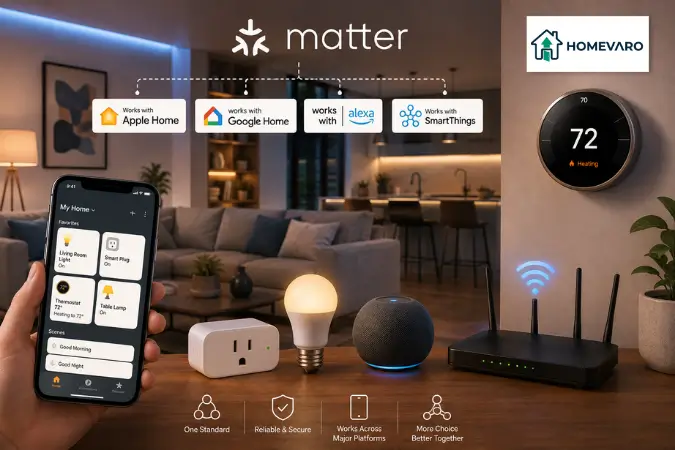
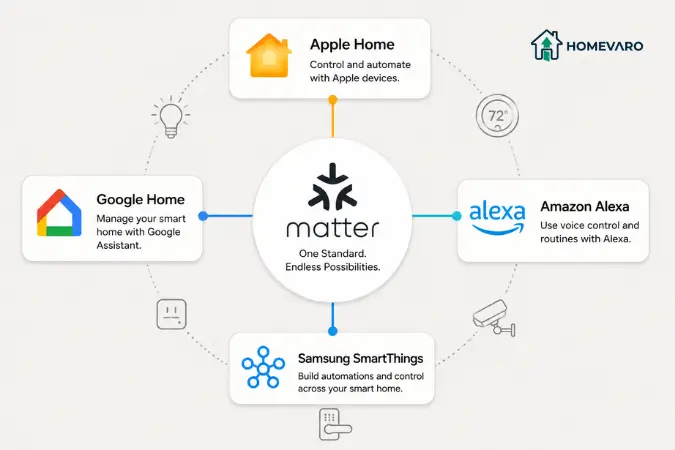
Short answer: Matter is a shared standard, backed by the Connectivity Standards Alliance, that lets certified devices from different brands work in the same smart home and be controlled from Apple Home, Google Home, Amazon Alexa, or Samsung SmartThings. A product with the Matter badge is built to pair with any of those platforms without a brand-specific app or hub. The badge covers basic control, not every advanced feature. Some Matter devices run over Wi-Fi and need nothing extra. Others run over Thread and need a Thread border router, which is often already built into a speaker, hub, or router you own. Before you buy, confirm three things, which we cover below.
If you are wiring together a thermostat, a few smart plugs, and some lights so they run on schedules, compatibility is the thing that quietly makes or breaks the whole plan. This guide explains what Matter guarantees, what it does not, and how to check any device before it becomes part of your setup. It is the compatibility layer under everything in how smart home automation lowers your energy bill, because automations only run if the devices can talk to each other in the first place.
The problem Matter was built to solve
For years, buying smart devices was a gamble. A bulb that worked with one voice assistant would not appear in another app. A sensor tied to one brand’s hub was useless outside it. People ended up with three apps, two hubs, and gadgets that refused to cooperate.
Matter is the industry’s answer to that mess. It launched in late 2022 and is maintained by the Connectivity Standards Alliance (CSA), a group whose members include Apple, Google, Amazon, and Samsung, as reported by the CSA and covered widely in 2026. The idea is simple: agree on one common language so a certified plug, bulb, lock, or thermostat pairs with any supporting platform, instead of one walled garden.
Matter is not a wireless radio like Wi-Fi. It is a layer that rides on top of existing networks. As of 2026, Matter runs over Wi-Fi, Thread, and Ethernet, so it slots into the home network you already have. That distinction matters later when we get to Thread.
What the Matter badge actually guarantees (and what it does not)
Here is the honest version, because this is where most explainers stop short.
What the badge does guarantee. A Matter-certified device is designed to be added to Apple Home, Google Home, Amazon Alexa, or Samsung SmartThings, and to handle the core actions for its type: on and off, brightness for a light, temperature for a thermostat, open and closed for a sensor. You should be able to set it up without the manufacturer’s own app.
What the badge does not guarantee. Matter standardizes the basics first and adds advanced features over time. A brand’s signature extras, think a thermostat’s proprietary learning mode or a bulb’s special effects, may only appear in that brand’s own app, not through Matter. Newer device categories are still being folded into the standard. Camera support, for example, has been arriving through recent Matter updates rather than being there from day one, so if you want a specific advanced feature, confirm it is exposed over Matter for your platform, as of 2026, verify before buying.
So the realistic expectation is this: Matter makes reliable cross-brand control the baseline. It does not promise that every premium feature travels across every ecosystem.
One device, several ecosystems: multi-admin
A genuinely useful Matter feature is called multi-admin. It lets a single physical device be controlled by more than one platform at the same time. As reported across 2026 coverage and platform documentation, one Matter plug can appear in Apple Home, Google Home, Alexa, and SmartThings simultaneously.
In practice you set the device up in one app, then use a “share” or “add to another service” option to generate a new pairing code, and add it to the second app. Nobody in the house has to agree on a single brand of phone or speaker. That flexibility is handy when your household mixes an iPhone, an Android tablet, and an Echo in the kitchen.
Thread in plain language (and when you need a border router)
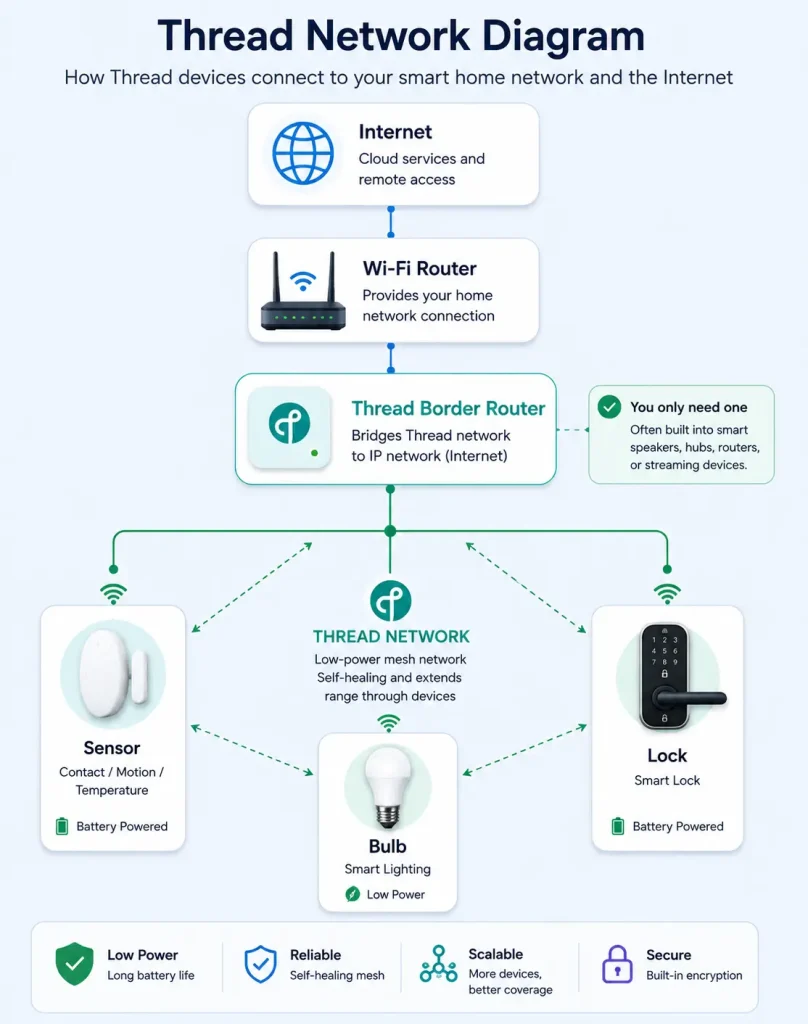
Thread is one of the networks Matter can run on, and it causes the most confusion, so here it is plainly.
Thread is a low-power wireless network built for small battery devices: contact and motion sensors, leak sensors, some locks, and certain bulbs and shades. Wi-Fi would drain those batteries quickly, so Thread sips power instead. Thread devices also relay signals for each other, forming a mesh that tends to be resilient.
The catch: a Thread network needs a bridge to reach the rest of your home and the internet. That bridge is a Thread border router. As reported in 2026, you only need one if you use Matter-over-Thread accessories, and there is a good chance you already own one. Border routers are commonly built into smart speakers, smart displays, streaming boxes, some Wi-Fi routers, and dedicated smart-home hubs. Check whether a device you already have includes one before assuming you need to buy anything, and verify the current spec for your specific model.
If a Matter device runs over Wi-Fi instead, it connects straight to your router like any other Wi-Fi gadget and needs no Thread border router at all.
Wi-Fi vs Thread for your energy devices
For an energy-and-automation setup, the split usually looks like this, though you should confirm each product’s own listing:
- Smart plugs and many smart switches: typically Matter-over-Wi-Fi. They are plugged into power, so battery life is not a concern, and they connect directly to your router.
- Smart thermostats: often Wi-Fi, since they are wired and benefit from a steady connection.
- Small battery sensors (motion, contact, temperature, leak): a common place to see Thread, because low power is the whole point.
- Smart bulbs: you will find both, depending on the brand and model.
The practical takeaway: your plugs and thermostat probably need nothing beyond Wi-Fi, while battery sensors may pull you into Thread and therefore a border router. Knowing this before you buy stops the classic surprise of a sensor that will not connect because nothing in the house speaks Thread.
Do you need a hub? A simple decision path
You do not always need a separate hub. Walk it in order:
- All your Matter devices are Wi-Fi or Ethernet? You likely need no dedicated hub, just your chosen app (Apple, Google, Alexa, or SmartThings) as the controller.
- You have Matter-over-Thread devices? You need a Thread border router. First check whether a speaker, display, streaming box, or router you already own provides one.
- You still own older Zigbee or Z-Wave devices? You need a bridge for those, covered next. Some hubs act as a Thread border router, a Zigbee coordinator, and a Matter controller in one box, which can replace a stack of separate bridges.
This is a decision path, not a shopping ranking. The right answer depends on which devices you actually own, so we are not naming a “best hub.”
Your older Zigbee and Z-Wave devices are not junk
If you already invested in Zigbee or Z-Wave gear, Matter does not make it obsolete. As reported in 2026, a Matter bridge can take existing Zigbee or Z-Wave devices and republish them to Apple Home, Google Home, Alexa, and SmartThings as Matter devices. Several current hubs do exactly this, letting legacy accessories and new Matter-over-Thread devices run side by side on one piece of hardware. You keep the sensors and switches you trust and add Matter around them, rather than tearing everything out.
The 3-point compatibility check before you add any device
Before any new device joins your setup, confirm these three things. Two minutes here prevents a returned box and a broken automation.
- Does it carry the Matter logo, and is it certified for your platform? Look for the badge and check that the listing names your ecosystem (Apple Home, Google Home, Alexa, or SmartThings). “Works with” one platform is not the same as Matter-certified.
- Wi-Fi or Thread? If it is Matter-over-Thread, make sure you have a Thread border router, in a hub, speaker, display, or router. If it is Wi-Fi, you are set.
- Which features come through Matter? If you are buying it for a specific advanced feature, confirm that feature is available over Matter for your app, not only in the maker’s own app. Verify against the current product page, since support changes.
Run those three checks and the odds of a device dropping out of your routines fall sharply.
How this keeps your energy automations from breaking
Compatibility is not trivia. It is the reason a schedule fires or fails. If a thermostat, a plug, and a light all live in the same controller and speak Matter reliably, you can build one setback routine that touches all three, exactly the kind of automation described in setting up a smart thermostat to save energy and in smart plug automations that cut standby power. If one device only works in its own app, it sits outside your routines and quietly costs you the savings you set out to capture.
The steady approach: pick one platform as your main controller, favor Matter-certified devices, run the three-point check before every purchase, and confirm the Thread question up front. Do that and your home runs on schedules instead of on you flipping switches, which is the entire point.
FAQ
What is Matter in simple terms?
Matter is a shared standard, maintained by the Connectivity Standards Alliance, that lets smart devices from different brands work together and be controlled from Apple Home, Google Home, Amazon Alexa, or Samsung SmartThings. A device with the Matter badge is built to join any of those platforms without a brand-specific app.
Does a Matter device work with Apple, Google, and Alexa at the same time?
Yes. A feature called multi-admin lets one Matter device be controlled by several platforms at once. You set it up in one app, then generate a share code to add it to the others, as reported in 2026 coverage. Verify the steps for your specific app.
What is a Thread border router and do I need one?
A Thread border router connects low-power Thread devices to your home network and the internet. You need one only if you use Matter-over-Thread accessories, such as some sensors, locks, or bulbs. Many people already have one built into a speaker, display, streaming box, router, or hub, so check before buying.
Will a Matter device work without a hub?
Often, yes. Matter devices that run over Wi-Fi connect straight to your router and need only a controller app. You may still need a Thread border router for Thread-based devices, and a bridge for older Zigbee or Z-Wave gear, but a separate hub is not always required.
If I already have Zigbee or older devices, are they useless now?
No. A Matter bridge can bring existing Zigbee or Z-Wave devices into Apple Home, Google Home, Alexa, or SmartThings by republishing them as Matter devices. Several current hubs do this, so your older sensors and switches can keep working alongside new Matter devices.