The C-Wire Question, and Where It Becomes a Tech’s Job
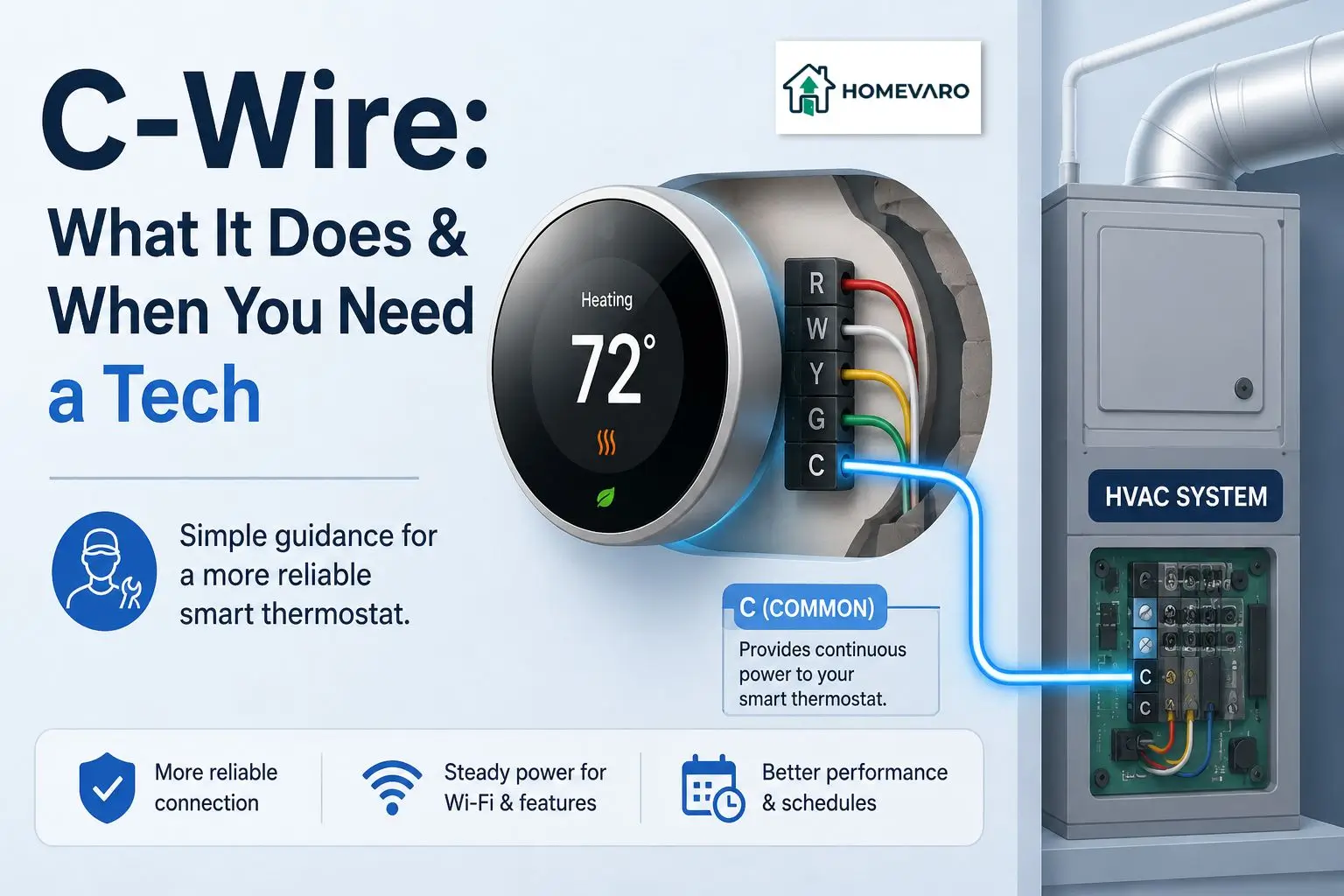
A C-wire, short for “common wire,” supplies your thermostat with continuous low-voltage power. It does not turn your heating or cooling on or off itself. Most smart thermostats work best with one because their screens, Wi-Fi radios and always-on features draw more power than an old mechanical thermostat ever needed, and without steady power they can lose connection, reboot, or lose some functionality. This page covers how to check whether you have one, what your options are if you don’t, and exactly where that stops being a homeowner task.
This assumes you already know you have a central, ducted system with a wall-mounted thermostat. If you have not confirmed that yet, start with identifying your system type first, since baseboard and line-voltage systems, covered separately, do not use a C-wire the same way at all.
What the C-wire actually does
Your thermostat controls heating and cooling by completing or breaking low-voltage circuits, one wire per function: one for the heat call, one for cooling, one for the fan, and so on. Those wires only carry power when the thermostat is actively calling for something. The C-wire is different: it provides constant, low-voltage power to the thermostat itself, independent of whatever the thermostat is currently calling for.
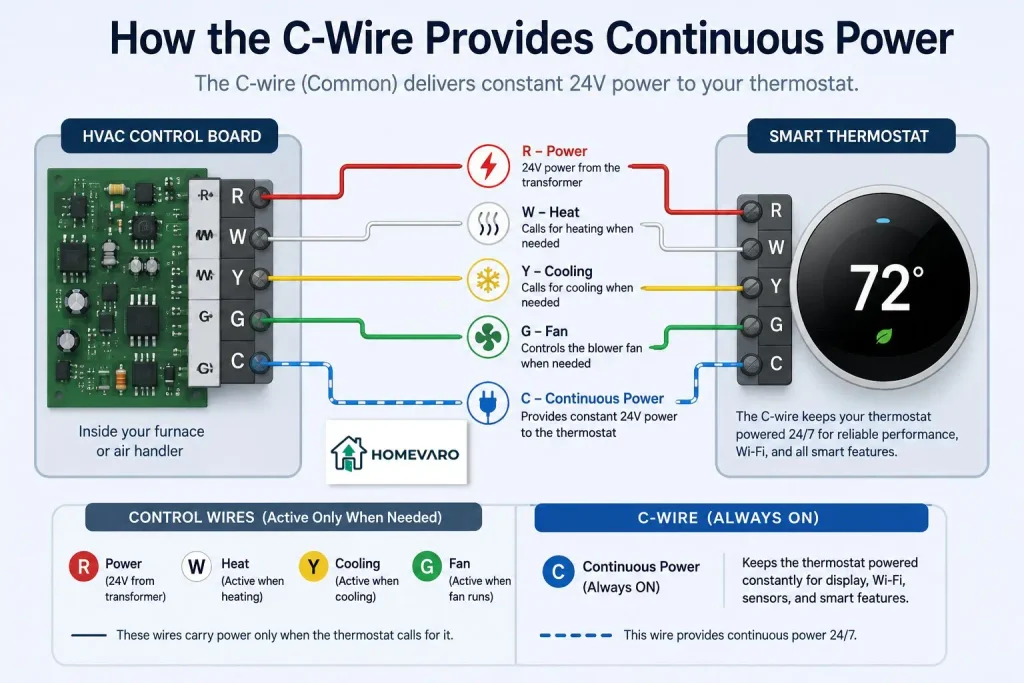
Older mechanical and simple digital thermostats could run without this constant power because they did not need much. A smart thermostat’s screen, connectivity and processing draw more, continuously, which is why the C-wire went from optional to effectively required as thermostats got smarter.
How to tell if you already have one
Turn off power to your HVAC system at the breaker or the system switch before touching any wiring, then remove your existing thermostat’s cover plate. Look at the wire terminals: if one wire is connected to a terminal labeled “C,” you have a C-wire already, whether or not it has been in use. The wire itself can be any color, so the label on the terminal is what to trust, not the wire’s color.
If there is no wire on the C terminal, and no unused wire tucked back into the wall behind the others, you likely do not have one run to that location.
Your options if you don’t have one
A few common paths exist if you confirm you have no C-wire:
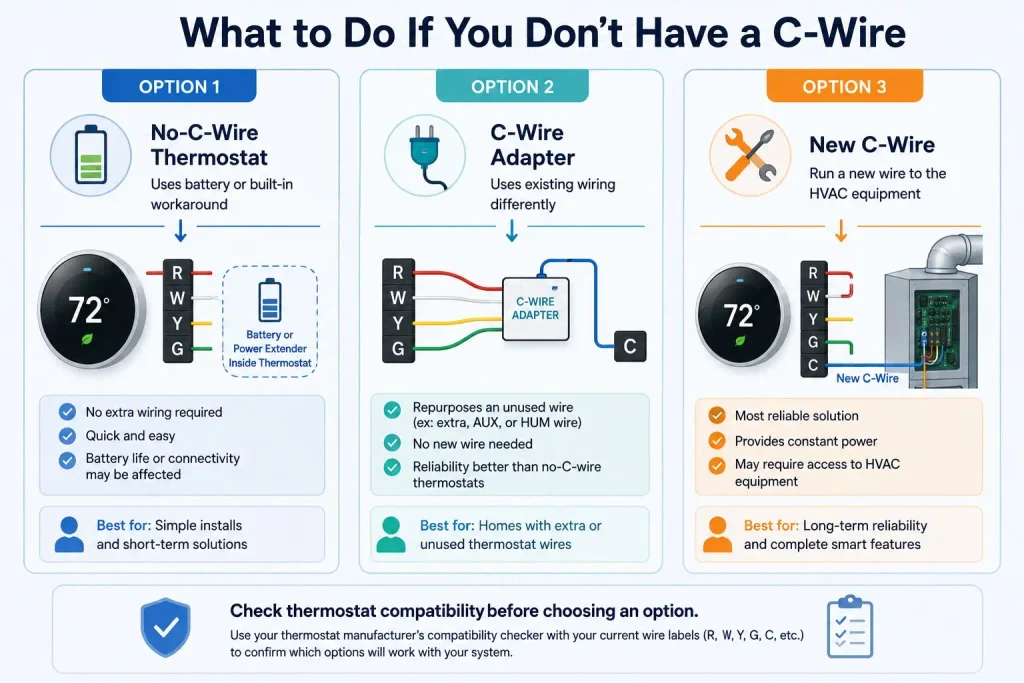
- A thermostat designed to run without one. Some smart thermostats include a battery or a “power extender” style workaround that lets them function without a dedicated C-wire, though usually with reduced reliability or occasional connectivity drops compared to running on a true C-wire. This is the option that requires nothing beyond installing the thermostat itself.
- An add-a-wire or “C-wire adapter” kit, which repurposes an existing unused wire (a second-stage or humidifier wire that your system does not otherwise use, for example) or shares power differently between the existing wires to simulate a C-wire connection at the thermostat end, without adding a new physical wire. This still only involves the wall plate at the thermostat, not the equipment’s control board.
- Running a new physical wire from the thermostat location back to the HVAC system’s control board, where a spare C terminal is often (not always) already present. This is the option most likely to require opening the equipment cabinet, which is where the line below applies.
Check your thermostat’s own compatibility tool before you buy
Before you decide whether you need a C-wire kit or a new physical wire, most major thermostat manufacturers publish an online compatibility checker that asks which wire letters you found on your old thermostat’s terminals (R, W, Y, G, C, and so on) and tells you directly whether that specific model will work with your setup, and whether it needs a C-wire to do so. Running your wire list through that tool before you buy is faster and more reliable than guessing from a general article, since compatibility genuinely varies by thermostat model and by how your specific system is wired.
The line: identification and homeowner-side wiring vs the furnace board
Checking your own thermostat’s wire terminals, reading your thermostat manufacturer’s compatibility checker, and connecting or reconnecting wires at the thermostat’s own wall plate (with system power off) are homeowner-level tasks that most manufacturers design their installation instructions around.
Opening your furnace, air handler, or boiler’s control board to add or move a wire at that end is a different job. That panel carries higher-voltage connections nearby, interacts with safety interlocks specific to your equipment, and a mistake there can affect more than your thermostat. If your C-wire situation requires anything at the equipment’s own control board rather than at the thermostat’s wall plate, that is where this stops being a homeowner project and becomes a licensed HVAC technician’s job.
What happens if you skip it anyway
A smart thermostat run without a C-wire, on a battery or extender workaround, is not necessarily broken. Many run this way for a long time. What typically shows up is intermittent Wi-Fi disconnects, a battery indicator that needs more frequent attention, or occasional loss of scheduling features until it reconnects. None of that is dangerous. It is a reliability trade-off, not a safety one, which is why it is reasonable to try the no-C-wire option first and only pursue a physical wire or adapter if the drops become a real problem.
Reliability here matters beyond convenience: the setback and recovery schedule covered on this site’s pillar guide only saves energy if it keeps running without interruption, so a thermostat that keeps dropping offline is quietly undoing the savings a good schedule is supposed to produce.
FAQ
What is a C-wire and do I actually need one?
It is the wire that gives a thermostat continuous low-voltage power. Most smart thermostats do not strictly require one to turn on, but they generally run more reliably with one because of the power their screens and Wi-Fi radios draw.
Can a smart thermostat work without a C-wire?
Often yes, either because the model includes a battery or a power-extender style workaround, or through an add-a-wire adapter kit. Reliability is usually somewhat lower than with a true C-wire connection.
Is a C-wire adapter safe to install myself?
Connecting or reconnecting wires at your thermostat’s own wall plate, with system power off, is generally a homeowner-level task most manufacturers write installation guides for. Anything that requires opening your furnace or air handler’s control board is a licensed HVAC technician’s job.
What color is the C-wire usually?
It varies by installation, though blue or black is common. The terminal label (“C”) on the thermostat’s wire plate is the reliable identifier, not the wire’s color.