Schedule, Geofence, or Learning: Which Should Run Your Thermostat
Open your thermostat’s app, and there is a good chance all three options are sitting right there: a schedule, a geofencing toggle, and a learning mode. Most guides online frame this as a purchase decision: which one should you buy? But if you already own the thermostat, that question is already answered. What is left is the real one: which of these three should actually be running your house?
You probably don’t have to choose just one
The three modes are not exclusive tiers where you pick the “best” one and ignore the rest. They solve different problems, and the strongest setups usually run more than one at a time, with each covering the other’s weak spot. Before ruling one out, it helps to know exactly what each is actually good at.
When a fixed schedule wins
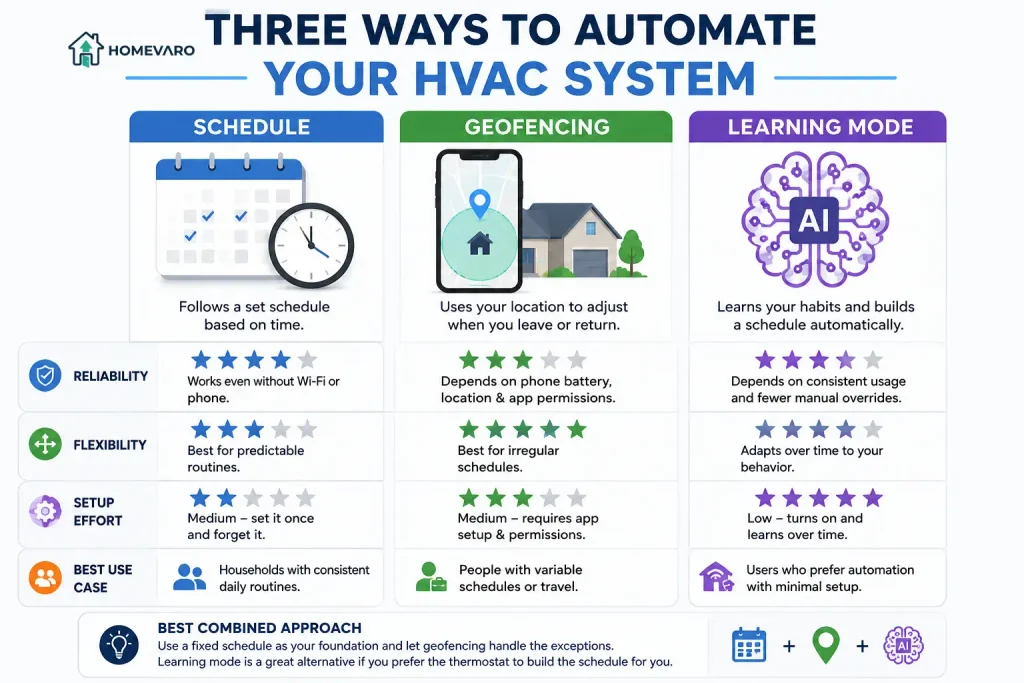
A schedule runs on the clock alone. It does not need your phone, your location, or a learning period. It is the most reliable of the three because it depends on nothing except the thermostat itself staying powered.
It wins for households with a genuinely repeatable rhythm: the same wake time, the same time the house empties out for work or school, the same return in the evening, most days of the week. If that describes your household, a schedule alone will hold up through a dead phone battery, a Wi-Fi outage, or a location-permission glitch that would trip up geofencing.
When geofencing wins
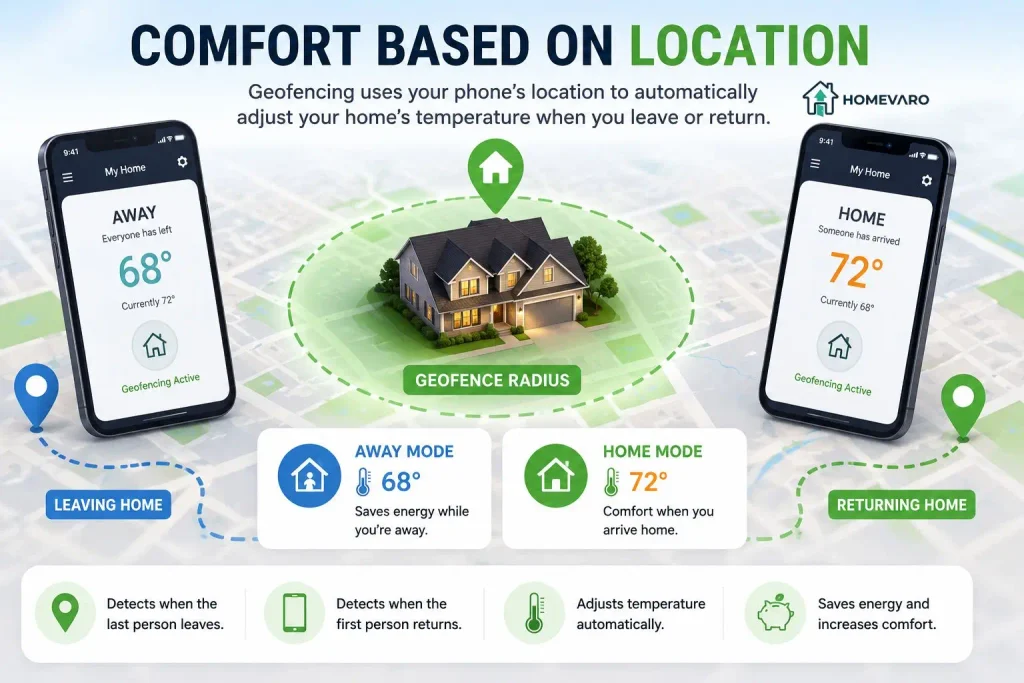
Geofencing uses your phone’s location to detect when the last person leaves the house and when the first person returns, then adjusts the setpoint automatically instead of waiting on a fixed clock time.
It wins for irregular schedules: shift work, inconsistent commutes, days that do not look like each other. A schedule tuned to a 5:30 p.m. return is wrong on the day you get home at 7:30, and it is wrong the other way on the day you leave early. Geofencing catches both without you touching the app.
The trade-off is real, not theoretical. Every phone in the house needs location sharing turned on for the thermostat’s app, and the feature can misfire in specific, well-documented ways: a phone left behind at home when its owner leaves, a dead battery that stops reporting a location, or a location update that arrives late and triggers the setback after you are already home. None of these are edge cases invented to caution you; they are the standard limitations cited across HVAC-contractor guidance on the feature.
When learning mode wins
Learning mode watches how you manually adjust the temperature over the first one to two weeks and builds a schedule from that pattern on its own. It is the lowest-effort option of the three if you do not want to sit down and build a schedule by hand.
The trade-off is that it keeps learning from whatever you do. If you override it constantly, it does not conclude that you want a fixed plan; it concludes that the pattern changed and adjusts toward your overrides. A learning thermostat that gets overridden every evening will quietly stop trying to hold an aggressive setback at all, and you will not necessarily notice the setback shrinking.
The combined setup that works for most households
The strongest real-world setup, and the one none of the standalone comparisons online actually recommends outright, is a fixed schedule as the backbone with geofencing layered on top to catch the exceptions. The schedule handles the routine days reliably and keeps working even if a phone dies. Geofencing overrides the schedule specifically on the days you leave early or come home late, so you are not stuck heating or cooling an empty house on the days your routine breaks.
Learning mode is a reasonable substitute for building the schedule by hand if you would rather not configure it yourself, provided you resist the urge to override it night after night. If you are still deciding what that copyable schedule should look like in the first place, start with the home, away, and sleep template here.
What each mode costs you in reliability
Every mode has a specific way it can quietly fail, and knowing which one is running tells you what to check first when something feels off:
- Schedule: fails only if the thermostat loses power or the clock/time zone is wrong. If your schedule has been drifting by an hour or shifting across the seasons, that points to a recovery-timing issue underneath the schedule, not the schedule itself.
- Geofencing: fails on a dead phone battery, a location permission turned off after an app update, or a phone left at home. If the house has recently gone into away mode while someone was actually home, or stayed warm after everyone left, geofencing is the first thing to check, and it is one of the direct causes behind a house that’s cold when you get up if the return trigger lagged.
- Learning mode: fails quietly through constant manual overrides, which train it away from the setback rather than toward it. If your bill has not moved despite “having a smart thermostat,” check whether the learning schedule has drifted toward holding one temperature all day.
None of these failure modes means the mode is broken. They mean the mode has a specific weak point, and running two together is how most households cover for it.
FAQ
Does geofencing save more energy than a fixed schedule?
No independent, dated comparison of the two exists; every source making that claim is a thermostat vendor or an HVAC contractor recommending the feature. What is well documented is that geofencing helps most when your comings and goings are genuinely irregular, and a fixed schedule performs just as well, more reliably, when they are not.
What happens if my phone’s battery dies and I’m using geofencing?
The thermostat stops receiving a location update from that phone, so it can no longer tell whether that person has left or returned. If nobody else’s phone is reporting a different status, the house typically stays in whatever mode it was last in until a location update comes back in, which is why a fixed schedule as a backstop is worth keeping even if geofencing is doing most of the day-to-day work.
Can I run a schedule and geofencing at the same time?
Yes, and this is the setup described above as working best for most households. The schedule sets the baseline; geofencing overrides it on the days someone leaves early or returns late.
Is learning mode worth it if I don’t want to configure anything?
It can be, as long as you let it run for the first week or two without frequent manual overrides. Constant overriding does not make it “smarter”; it teaches the thermostat to abandon the pattern it was starting to learn.